DispaKit is completely free for the first 50 companies.Check availability
Truck dispatch operator coordinating freight from a logistics office

Turn carrier data into booked loads.

One connected workspace for FMCSA and MOTUS records, assigned carrier calls, qualified leads, dispatch operations, and team control.

  1. 01Carrier data
  2. 02Assigned calls
  3. 03Qualified leads
  4. 04Dispatched loads

From the first MC number to the final delivery status, DispaKit keeps the carrier record, responsible user, latest decision, and next action connected.

Company ownersSales agentsDispatchersOperations managers

One operating system for carrier sales and dispatch.

Build the database, distribute the work, capture every result, and move useful carrier relationships forward without rebuilding the context in another tool.

01

Assign a real workload. Process it in place.

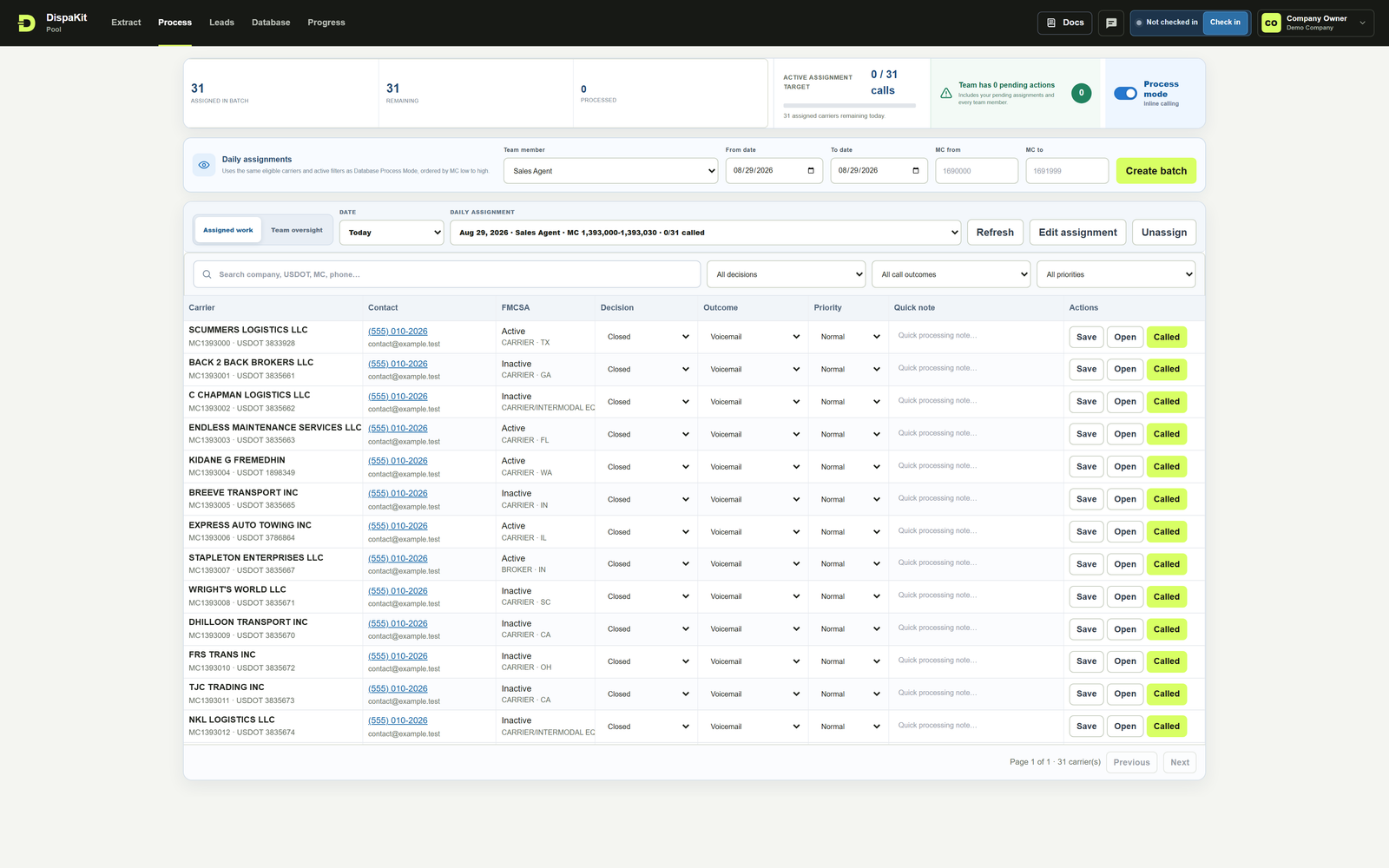
Create an inclusive MC assignment for an eligible user, open Process Mode, and work the complete call queue with decisions, outcomes, priorities, notes, and call actions visible together.

  • Only Process Data users appear in assignment controls
  • Active assignment target and remaining work stay visible
  • Inline updates remove spreadsheet handoffs
See assignment documentation
Pool / Process Mode31 assigned carriers
DispaKit Process Mode with an assigned 31-carrier MC batch and inline calling controls
02

Build one carrier record from the source.

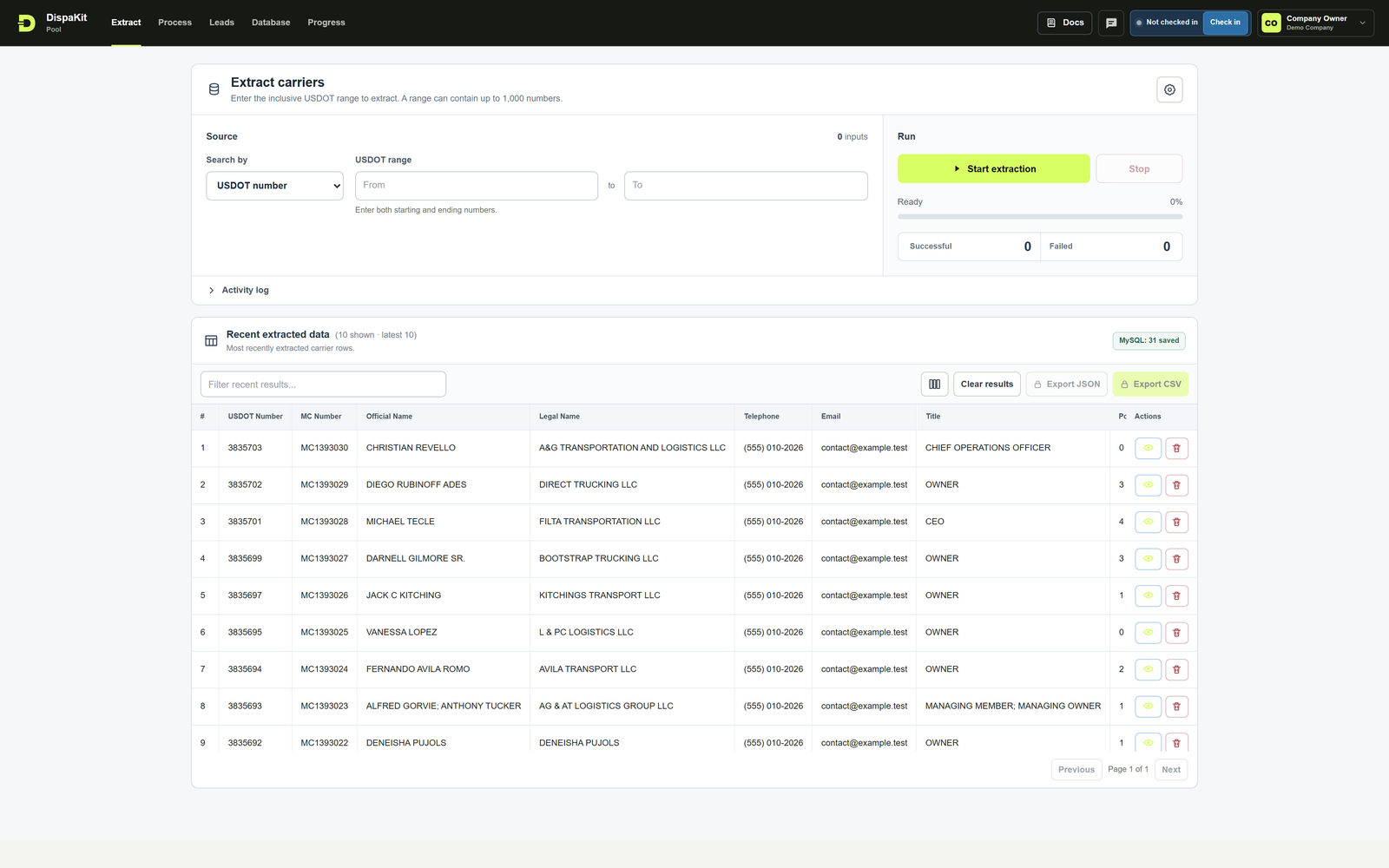
Extract a precise range and keep FMCSA and MOTUS information together. Search, review, and save the exact carrier records your team will process.

  • Any, Exact, Less than, and Greater than fleet rules
  • Suggested Exact 1 / 1 fleet configuration
  • Saved database with controlled export access
See Extract documentation
Pool / ExtractFMCSA + MOTUS
DispaKit Extract workspace with carrier records

A complete path from MC number to delivery

Every stage reads the result of the stage before it, so the team spends less time rebuilding lists and explaining handoffs.

  1. 01

    Build the carrier database

    Extract an MC range and review combined FMCSA and MOTUS carrier information in one saved record.

  2. 02

    Assign the right work

    Give an inclusive MC range only to users who have Process Data access.

  3. 03

    Record every call

    Save the decision, call outcome, priority, follow-up date, and notes against the carrier.

  4. 04

    Move qualified work forward

    Use lead status and carrier context to support dispatch, delivery, and payment tracking.

The work stays visible.

Move through carrier sourcing, assigned calls, carrier details, and team progress without losing the context.

Explore all Pool Docs

Start with a precise MC range

Choose an inclusive range, apply exact fleet filters, and save the combined carrier records your team needs.

  • FMCSA and MOTUS information in one workflow
  • Any, Exact, Less than, and Greater than fleet rules
  • Saved carrier database with protected export controls
Read Extract documentation
DispaKit Extract workspace with MC range and recent carrier data

Four tools. One company account.

The owner creates the workspace, adds the team, and controls exactly which product areas each person can use.

Create company

Pool

Extract carriers, manage the database, assign MC ranges, process calls, classify leads, and review progress.

Explore Pool

Dispatch

Book loads, manage routes and delivery status, keep driver context together, and track company and dispatcher profit.

Mailbox

Connect sender accounts, prepare templates, and review email history. Campaign sending remains marked Coming soon.

User Administration

Create users, choose roles and permissions, control exports, and keep operational access scoped to the company.

Control for the work behind the calls.

Professional operations need more than a carrier table. DispaKit keeps assignment access, data safety, account verification, and team accountability explicit.

Role-scoped access

Database access is not given to sales agents by default. Tools and actions follow explicit company permissions.

Daily assignment control

Only active users with Process Data access appear when an MC workload is assigned.

Progress and attendance

Review company activity, individual reports, daily minimum time, weekends, and historical assignment oversight.

Protected deletion

Carrier data already used by Leads or Dispatch stays protected, while historical user reporting is preserved.

Public documentation

Follow the complete Pool workflow before creating an account, from extraction through daily reporting.

Email verification

A new company owner must verify the work email with an OTP before the account is created.

The handoff should not lose the carrier.

Carrier sourcing, sales calls, qualified interest, load execution, and payment tracking belong to one operational story. DispaKit keeps the record moving with the team instead of leaving it behind in a spreadsheet.

See the recommended daily routine

Open the carrier. Keep the context.

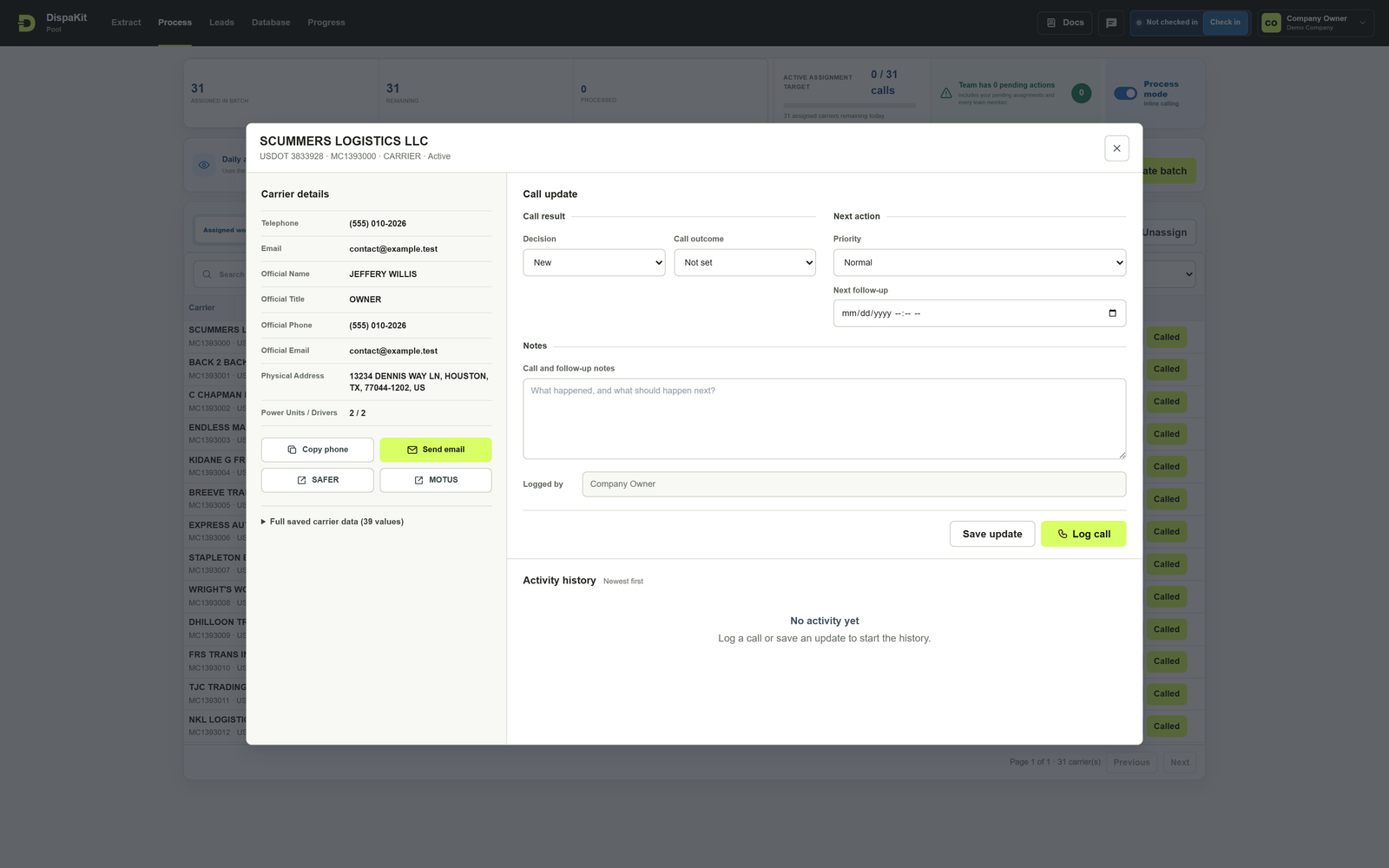
Move from the assigned row into a focused workflow for carrier information, call results, next actions, notes, and activity history.

DispaKit Carrier Workflow showing carrier details, call update fields, notes, and activity history

Understand the workflow before creating an account.

DispaKit Docs are public. Review every Pool step and follow the complete MC 1393000–1393030 workflow without logging in.

Open public Docs

Before you start.

Who creates the company workspace?

The first person registers as the company owner, verifies the email address with an OTP, and then creates users under that company.

Can every user access all carrier data?

No. Company owners and administrators control tool permissions and individual access. Pool Database access is not granted to a sales agent by default.

How do Pool assignments work?

An authorized user selects an inclusive first and last MC number in Process Data and assigns that range to an eligible user with Process Data access.

Is campaign sending available?

Mailbox accounts, templates, settings, and email history are organized in the product. Send Campaign is locked and labeled Coming soon until the sending workflow is released.

Give the team one place to do the work.

Create the company account, verify your email, and configure each user’s access from one administration area.

Create your company Read the Docs